


Best overall: CRM-connected marketing automation. Best for complex buying committees: account-based automation. Best for a narrow nurture requirement: email-first automation. If your leads keep receiving messages while sales opportunities stall, choose a platform around CRM stage changes, ownership, and buying decisions—not the length of its feature list.
- The best marketing automation platforms for long B2B sales cycles connect nurture decisions to CRM opportunity stages.
- Choose account-based automation when several stakeholders influence the same purchase.
- Choose email-first automation only when lead routing and opportunity tracking already work.
- VadeCom is a B2B marketing agency, not a marketing automation software vendor.
Why does platform choice matter for a long B2B sales cycle?
Related: SEO Services — or see every industry we serve in B2B marketing.
A long sales cycle needs more than scheduled reminders. Your system must distinguish a researcher from an active buyer, preserve account context, and stop automated messages when a salesperson takes ownership. Otherwise, marketing and sales communicate with the same prospect without sharing the same facts.
Start by defining leads, qualified leads, and opportunities in the CRM. Software selection comes after those definitions—not before them.
For your 2026 shortlist, compare operating approaches rather than treating every automation product as interchangeable. The options below describe configurations to evaluate, not claims about named vendors. Each configuration addresses a different buying problem.
What makes the best marketing automation platforms for long B2B sales cycles?
Use these criteria before you request demonstrations:
- CRM stage control: Workflows must respond to qualification, opportunity creation, disqualification, and sales ownership.
- Account context: Your team must see related contacts and their roles without confusing contact activity with account readiness.
- Reliable handoffs: Every qualified inquiry needs an owner, a next action, and a visible exception when routing fails.
- Nurture controls: Sales replies, opt-outs, and opportunity changes must trigger appropriate pauses or exits.
- Language handling: Arabic and English preferences must remain consistent across forms, records, and messages.
- Commercial reporting: Reports must distinguish submissions, qualified leads, accepted opportunities, and closed business.
A platform fails the shortlist if it cannot demonstrate your required workflow using your actual CRM fields. A feature checkbox does not prove that the configuration works.
Which automation approach fits your team at a glance?
| Rank and approach | Best for | Standout design requirement | Key limitation |
|---|---|---|---|
| CRM-connected automation | Teams losing leads between marketing and sales | Opportunity-stage triggers and visible ownership | Depends on disciplined CRM updates |
| Account-based automation | Deals involving several buying roles | Shared account context across related contacts | Requires accurate account matching |
| Modular automation | Companies keeping established business systems | Explicit data contracts between connected systems | Creates integration maintenance work |
| Email-first automation | A defined nurture gap with working sales processes | Relevant sequences with clear stop conditions | Email engagement does not establish qualification |
| Sales-assisted automation | Low-volume, high-context opportunities | Internal prompts with human approval | Depends on salesperson follow-through |
Treat this 2026 table as a decision tree. Start with the failure in your pipeline, then choose the configuration that fixes it without introducing unnecessary administration.
1. CRM-connected automation: best for marketing-to-sales handoffs
CRM-connected automation uses sales records to decide what happens next. A qualification update can change nurture eligibility, an opportunity can pause acquisition messaging, and a missing owner can create an internal exception.
Best for: B2B teams whose inquiries reach the business but do not become consistently owned sales conversations. This is the default configuration to evaluate before buying another standalone messaging tool.
For an industrial supplier, the relevant distinction is not whether someone opened a brochure. It is whether the contact represents a suitable company, has a relevant requirement, and has an agreed next step with sales.
CRM-connected automation pros:
- Connects marketing decisions to sales stages.
- Makes lead ownership part of the workflow.
- Supports reporting against accepted opportunities.
CRM-connected automation cons:
- Incorrect CRM stages trigger incorrect actions.
- Unrecorded sales conversations leave automation without necessary context.
- Field mapping and exception handling require explicit design.
During the demonstration, change an opportunity stage and inspect the resulting workflow. Then remove the record owner. Require the configuration to surface that exception rather than quietly continuing the sequence.
Verdict: Buy when the demonstrated CRM controls match your handoff requirements.
2. Account-based automation: best for buying committees
Account-based automation organizes activity around the buying company, with contacts attached to relevant roles. Your workflow can then distinguish technical evaluation, commercial negotiation, and procurement requirements without treating every person as an unrelated lead.
Best for: Construction, engineering, industrial, and professional-services teams selling into accounts where different people evaluate different parts of the purchase.
The key requirement is a trustworthy relationship between contacts, accounts, and opportunities. A parent company, subsidiary, distributor, and end customer must not collapse into the same record simply because names look similar.
Account-based automation pros:
- Keeps stakeholder activity in a shared account context.
- Supports role-specific content and follow-up.
- Gives sales a clearer view of missing buying roles.
Account-based automation cons:
- Poor account matching corrupts the workflow.
- Unknown stakeholder roles limit meaningful segmentation.
- Account activity still needs sales interpretation.
Ask the implementation team to show an account with technical and procurement contacts. Confirm that communication preferences remain contact-specific while opportunity context remains visible at account level.
Verdict: Buy when buying-group coordination is the documented bottleneck; otherwise, Hold until account data is usable.
3. Modular automation: best for preserving established systems
Modular automation connects separate systems through defined integrations. Your CRM remains responsible for sales records while other components handle forms, messaging, tracking, or internal alerts.
Best for: Businesses that already depend on established operational systems and need targeted automation without replacing the entire stack.
The purchase decision is partly an integration decision. Evaluate what happens when a connection fails, a field changes, or the same inquiry arrives through different channels. The website-form-to-CRM workflow is a useful starting point for that review.
Modular automation pros:
- Preserves systems that already serve the business.
- Allows a narrowly defined workflow to be implemented separately.
- Makes system responsibilities explicit when properly documented.
Modular automation cons:
- Every connection introduces a maintenance responsibility.
- Conflicting field definitions create synchronization errors.
- Troubleshooting requires visibility across system boundaries.
For your 2026 procurement brief, require a field map, an integration owner, and an error-recovery procedure. Confirm whether failed events can be inspected and replayed without creating duplicate records.
Verdict: Buy when preserving existing systems is necessary and integration ownership is assigned.
4. Email-first automation: best for a defined nurture gap
Email-first automation centers on segmented message sequences. It suits a specific requirement such as helping suitable prospects understand an application, prepare for a technical discussion, or revisit a deferred project.
Best for: Teams with functioning qualification and sales ownership that need consistent follow-up content—not a replacement for those processes.
Write the sequence around buyer questions. An equipment buyer needs application evidence and technical requirements; a procurement contact needs clear scope and purchasing information. Sending the same material to both ignores their different jobs.
Email-first automation pros:
- Focuses implementation on a defined communication problem.
- Supports language- and role-specific nurture.
- Makes message order and exit conditions easy to review.
Email-first automation cons:
- Opens and clicks do not prove buying intent.
- Disconnected sequences ignore sales-stage changes.
- More messages do not resolve an unsuitable offer or audience.
Review the B2B nurture-sequence setup alongside your sales process. Define what stops the sequence before defining what sends the next message.
Verdict: Buy for a bounded nurture requirement; Skip as the main solution to missing qualification or ownership.
5. Sales-assisted automation: best for high-context opportunities
Sales-assisted automation creates internal tasks, reminders, and suggested next actions while leaving sensitive customer communication under human control. The salesperson reviews the situation before anything consequential reaches the buyer.
Best for: Teams handling bespoke projects, tender discussions, complex specifications, or opportunities where a generic message would conflict with an active negotiation.
An internal reminder can identify missing information without pretending to understand the entire deal. The record should explain why the task exists and what the owner must resolve.
Sales-assisted automation pros:
- Keeps judgment with the responsible salesperson.
- Makes overdue actions visible.
- Reduces the risk of inappropriate automated outreach.
Sales-assisted automation cons:
- Tasks still require human completion.
- Excessive alerts become administrative noise.
- Missing CRM updates undermine reminders.
Ask sales to review sample tasks before rollout. Remove alerts that have no clear action, owner, or completion condition.
Verdict: Buy when deal context requires human judgment; Hold if sales cannot maintain the underlying records.
How should you test an automation platform before signing?
Use a controlled workflow demonstration, not a presentation built around the vendor's easiest features. Your 2026 acceptance brief should follow an inquiry from arrival to opportunity creation and include the exceptions that concern your team.
Structure the test around these checkpoints:
- Capture: Submit an inquiry with source information and a language preference.
- Qualification: Record the company fit, requirement, and reason for acceptance or rejection.
- Ownership: Assign the responsible salesperson and confirm the next action.
- Nurture: Start relevant follow-up and verify its stop conditions.
- Opportunity: Create an accepted opportunity without losing inquiry history.
- Reporting: Trace the opportunity back to its source and qualification decision.
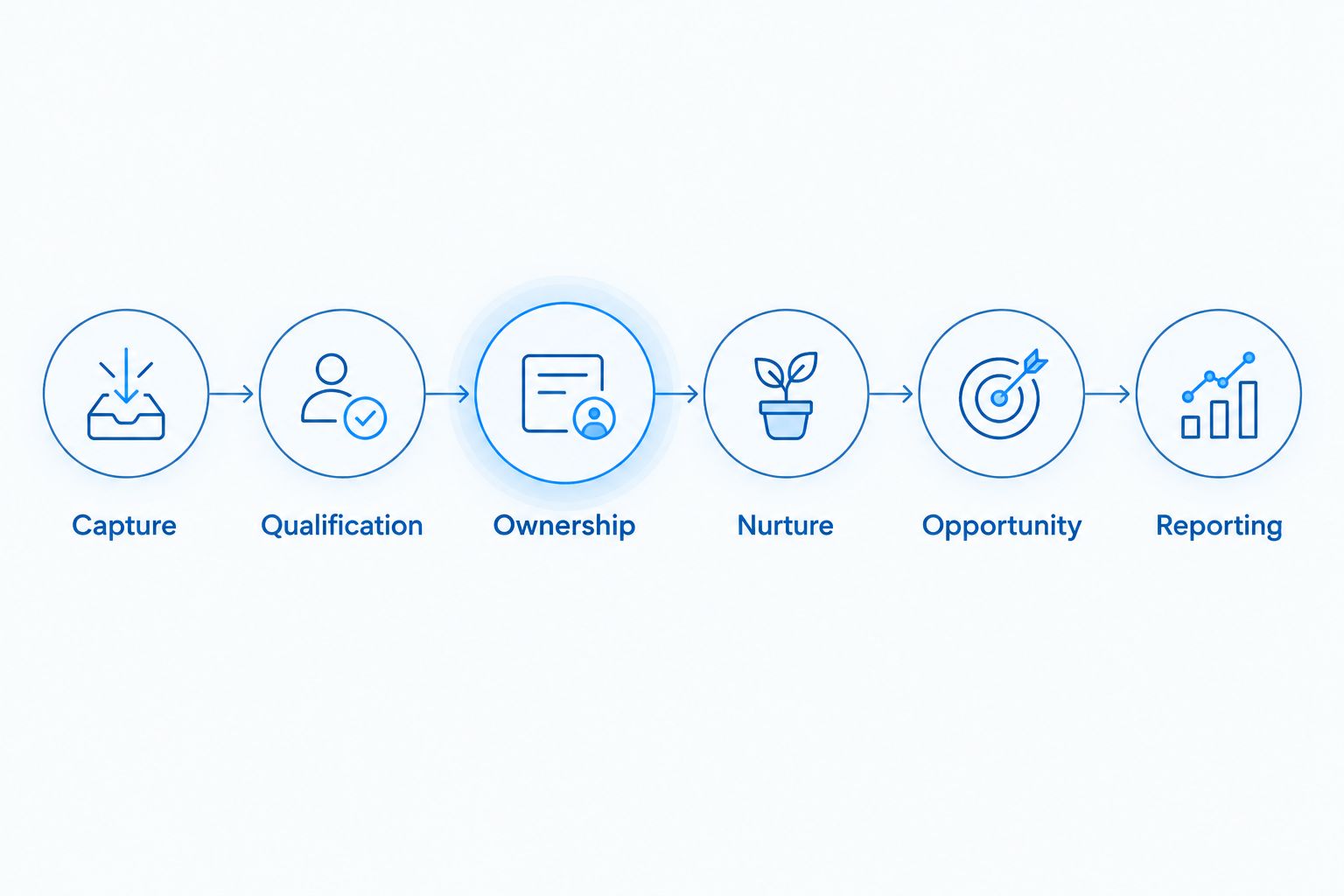
Repeat the demonstration with a duplicate inquiry, an opt-out, a reassigned owner, and a failed integration. A successful normal path is not sufficient evidence of a dependable operating process.
Require written acceptance criteria. Record which component owns each field, who can change qualification rules, and how your team identifies records that need manual review.
What should your agency and software contracts separate?
Separate software licensing from implementation and ongoing operation. Your procurement brief should identify responsibility for CRM mapping, content, language handling, tracking, training, maintenance, and reporting. Do not assume that buying software includes those services.
VadeCom is suited to B2B companies seeking a connected demand-generation system measured by qualified sales opportunities. VadeCom marketing automation work belongs within its agency model: bilingual websites, advertising, technical SEO, and CRM-connected lead tracking—not a proprietary platform ranking.
The provided agency-system starting floors are $800/month, 40,000 EGP, and 3,000 SAR for Saudi-facing engagements. These are service starting floors, not automation-software prices; require the proposal to state which system components and operating responsibilities the quoted scope includes.
A VadeCom B2B marketing engagement does not remove your sales team's responsibility for qualification and CRM updates. Keep client-side owners visible in the statement of work.
How is this ranking organized?
This guide ranks configurations by the buying problem they address: handoffs, buying committees, existing systems, nurture gaps, and human-led sales. It does not claim that a named platform has passed testing or provides a particular feature.
The default recommendation puts CRM-connected automation first because the decision criteria center on opportunity status and ownership. A different configuration wins when your documented requirement calls for it.
Which approach should you choose in 2026?
Choose CRM-connected automation unless a specific operational requirement points elsewhere. Add account context for buying committees, preserve established systems through documented integrations, and keep sensitive deal communication under salesperson control.
Before expanding your workflows, audit the difference between many leads and few sales opportunities. Then define how you will measure marketing ROI across a long B2B sales cycle. Automation should support that measurement—not substitute activity counts for commercial progress.
The most useful acceptance test is a stop test: create an active opportunity and confirm that inappropriate prospecting messages stop. A system that sends reliably but cannot stop correctly is not ready for a complex sales process.
FAQ
What’s the best marketing automation approach for a long B2B sales cycle?
CRM-connected automation is the default choice when your priority is qualification, sales ownership, and opportunity tracking. Choose the configuration that demonstrates your required stage changes, pauses, and handoffs using your actual CRM fields.
Should we choose account-based automation instead of contact-based nurture?
Choose account-based automation when several stakeholders influence the same purchase and you need shared account context. Keep contact-level permissions and communication preferences separate from account-level opportunity information.
Can email automation fix a pipeline with many leads but few opportunities?
Email automation alone does not fix missing qualification, ownership, or an unsuitable audience. Diagnose why sales rejects or loses inquiries before expanding nurture sequences.
Do we need to replace our CRM to automate marketing?
CRM replacement is not a prerequisite for marketing automation. First test whether your existing system supports the required records, integrations, stage changes, and exception handling.
How should we handle Arabic and English nurture?
Store the buyer’s language preference and use it consistently in forms, records, and messages. Test that language changes do not create duplicate contacts or send both sequences to the same person.
What should we measure before closed revenue appears?
Measure qualified leads, sales acceptance, opportunity creation, and stage progression with clearly defined denominators. Keep engagement metrics separate so that message activity does not appear as pipeline growth.
What should a platform demonstration prove?
A platform demonstration should prove the complete workflow from inquiry capture to opportunity reporting. Include duplicate records, opt-outs, owner changes, failed integrations, and the stop conditions for nurture.
Is VadeCom a marketing automation software platform?
VadeCom is a B2B marketing agency, not a software platform. Its stated services connect websites, advertising, technical SEO, and CRM-connected lead tracking around qualified sales opportunities.


